
Today we release Mirage, a small vision model for phones, wearables, robots and other consumer devices. It describes scenes, detects objects, reads text, generates segmentation masks, identifies spatial relations and makes decisions in a single pass, taking 74 ms end to end on a Samsung Galaxy S26 NPU or 107 ms on its CPU.
Mirage has 51.3 million parameters and fits in about 22 MB using our 2-bit Cactus Quants. It runs in the same binaries as Needle and Whistle.
Try pointing your camera at something nearby, such as a mug on a desk or a label on a box. You can also upload a photo. The model runs locally in your browser, and the overlays show its predictions.
Start the camera or upload an image.
Description
The scene description will appear here.
JSON
Scene, objects, text, relationships and reasoning will appear here.
What comes back
Mirage gives your app a record it can work with. Each part answers a different question about the same image.
It describes images in English, German, French, Spanish, Italian, Dutch and Polish.
- The scene. What kind of place is this? What are the lighting, surface and background like?
- Objects and their properties. Names, boxes, positions and attributes such as colour, shape or material. Names come from the language model, so they are not restricted to a detector's fixed class list.
- Segmentation. A mask for each described object. Keep an outline, all its separate pieces, or a bitmap mask, depending on what you want to draw or select.
- Text. The writing in the image, with a box and a detection score for each text region. A text reader inside Mirage reads the crops.
- Relations and events. Which object is attached to another, what is on the table, or which action is depicted. References connect these descriptions to the objects in the result.
- Decisions and forms. A choice from labels you supply, a count within a range, a short text field, or a box linked to a chosen object.
Here is a small example from the released 2-bit model. Switch between the views to see what it found in one photo.
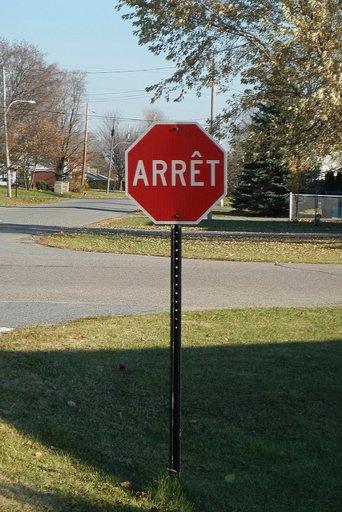
Mirage names the stop sign and pole, places their boxes and traces their masks.
- stop sign
- red · octagonal · standing
- Detection score 0.644
- pole
- black · metal
- Detection score 0.558
The names, attributes and relations form a small scene graph. This is what we mean by an ontology here. Your app can follow a relation from the sign to its pole, or find the objects described as red, using the fields directly.
The result also includes a short reasoning trace. It makes the model's description easier to inspect, including details it may have inferred incorrectly. It is generated text, so it deserves the same scrutiny as the rest of the answer.
Get started
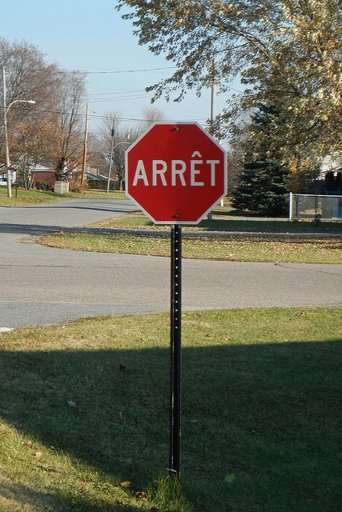
pip install -U cactus-computeSave the example photo as photo.jpg, or use the path to one of your own images.
import cactus

vision = cactus.Mirage()
result = vision.describe("photo.jpg")
print(result)
The base install includes image decoding. The first use downloads the engine and weights; subsequent uses reuse the cached files. Image inference runs on your device. You can pass a file path, encoded image bytes, a Pillow image or an RGB array.
Once you've seen the full result, ask for just the parts your app needs. For objects, masks and writing, for example:
result = vision.describe(
    "photo.jpg",
    sections=["objects", "text"],
    fields=["bbox", "score", "mask"],
    mask_format="polygons",
)
Boxes use a 0 to 1000 coordinate scale relative to the image. conf and text_conf set the minimum detection scores, and max_objects, max_text_lines and max_tokens bound the output. Pass language="de", for example, to ask for a description in German.
Give it a decision to make
Sometimes an app needs one answer from a small set. Using the same vision instance and photo, you can ask Mirage to score a set of choices and return the selected value alongside their probabilities.
result = vision.extract("photo.jpg", {
    "sign": {"enum": ["stop", "yield", "speed limit"]}
})
print(result["form"]["sign"])
Use Mirage with a text model
If you already run an LLM, you can pass it Mirage's JSON alongside a question about the image. Mirage handles perception; the language model reads the observations as ordinary text. Neither model needs a new adapter or a change to its weights.
We tested this with Qwen3-0.6B on 256 VQAv2 validation questions from 128 images. With Mirage's structured record and complete trace, the system scored 31.3 out of 100 on VQA consensus credit. Giving it another image's record scored 22.2. Omitting the trace produced 33.1, so we did not find a reliable benefit from including it.
This is a small exploration of a text interface for vision. Qwen never sees the pixels, and a detail missing from Mirage's record remains unavailable to it. The experiment in Structured Visuo-Semantic Perception includes the method, runnable code, all recorded answers and examples where the composition succeeds or makes a mistake. Follow-up runs with larger text-only readers did not establish consistent gains; their results and answer-format failures are included in the experiment record.
Inside the model
The Mirage architecture
HConvGLU keeps channel mixing small. Throughout the encoder, fixed Walsh-Hadamard transforms surround three learned, 65-channel banded convolutions. A gate controls which values pass through. Each convolution stores 512 × 65 weights, about 8 times fewer than a full 512 × 512 matrix, while the transforms let all channels interact.
The encoder works on 256 image cells. Grouped-query attention shares key/value projections, four register tokens provide temporary working space, and gated level memory blends earlier features into the final grid without adding more tokens. Global Response Normalisation balances channel responses. Finer stem features feed the detection and mask heads, preserving detail without running the full encoder at that resolution.
The eight-layer decoder shares the Simple Attention family used by Needle and Whistle, with Hadamard MLPs, engram lookups and four mHC residual lanes. It reuses cached image memory and writes short references to detected boxes. The engine combines its description with the boxes, masks and OCR to produce JSON. This division of work cuts the number of tokens the decoder needs to generate.
Most quantised matrices use 2 bits. The token embedding and mHC routing matrices stay at 4 bits. HConvGLU bands stay at 16-bit floating point, alongside the other floating-point tensors the model retains. This is the deployment scheme behind the 21.6 MB file.
The companion articles explain shared instance masks, OCR across overlapping windows and Gabor initialisation in more detail.
Deploy
For a native application, cactus_load loads mirage.cact and cactus_describe accepts RGB pixels and the same options. Needle, Whistle and Mirage can all be loaded into the same engine, with their weights kept separately.
The Python reference covers the API. Mirage's weights and config are on Hugging Face, and engine binaries and supported platforms have their own repository.
Find the source code on GitHub.